§ Product · Customers and suppliers

The people outside your walls get a front door, too.

Applicants, claimants, vendors and brokers apply through a public site your team edits, get a secure link instead of a password, see what is still needed and upload it, and hear the decision with its reasons. They are asked by email, text or phone, in the order you set, and everything they send lands on the same case your team works.

FIG. 01 · What the applicant seesIllustration
  1. InA one-time secure link
    • No account, no password
  2. Their caseWhere it stands
    • What is still needed
    • An upload for each
  3. Back on the caseThe case moves on
    • The same record your team works
  4. OutThe decision, explained
    • The outcome and why
§ 01Your public site

A public site and forms your own team changes.

The application form, its consent wording and what an outside party sees are set in Settings, by your administrators, without a release from us. A drafting assistant can propose the site from a description, and nothing goes live until someone publishes it. A submission becomes a case straight away.
§ 03What is needed

Where the case stands, and what is still needed.

They see where their case is, a plain checklist of what is still outstanding, and an upload for each item. When the upload arrives it is checked against what was asked for and the case moves on. No email back and forth.

§ 04How they are reached

Email, text, phone and a secure link, in the order you set.

Requests and reminders go by email first, then a secure link, a text or a phone call, on the schedule you set, and every message comes from wording you approved. Appointments are offered and booked in writing or on a call, and a callback is matched to the right case before anything is said.

Calls and their rules →Appointments →

§ 05The decision

The decision, explained.

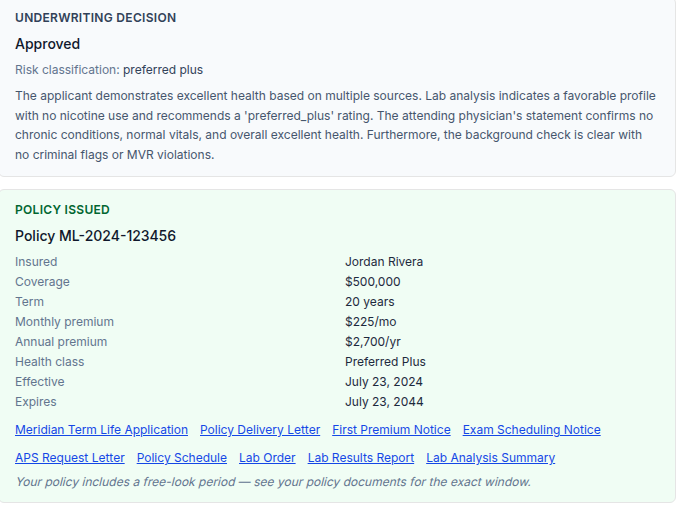
When a person has decided, the applicant sees the outcome with a plain explanation and, where relevant, the issued policy or document delivered to the portal. The portal and your team read the same case, so nothing the applicant does lives in a separate system.

The applicant’s portal: the underwriting decision, Approved, with its explanation, and the issued policy with its coverage, term and premium, and the documents to download.
The decision, explainedWhat the applicant sees · a fictional applicant
§ 06Intake by conversation

An assistant can take the application.

On the public site, an AI assistant can hold the intake conversation: it asks the qualifying questions, answers the applicant's, and submits the application once it has enough. Applicants who would rather type into a form can; both land on the same case.

It runs in the self-submitted term-life run: a first conversation on a website becomes a policy in force, with one approval by a person.

§ Next step

From first inquiry to policy in force, self-served.

The self-submitted term-life run shows the whole front door end to end: an applicant applies, uploads what is outstanding and gets the decision explained, on the same case your team reads.

Map a process →Watch it run end to end